Telco company

2023

Optimised TV box onboarding experience to cut support calls
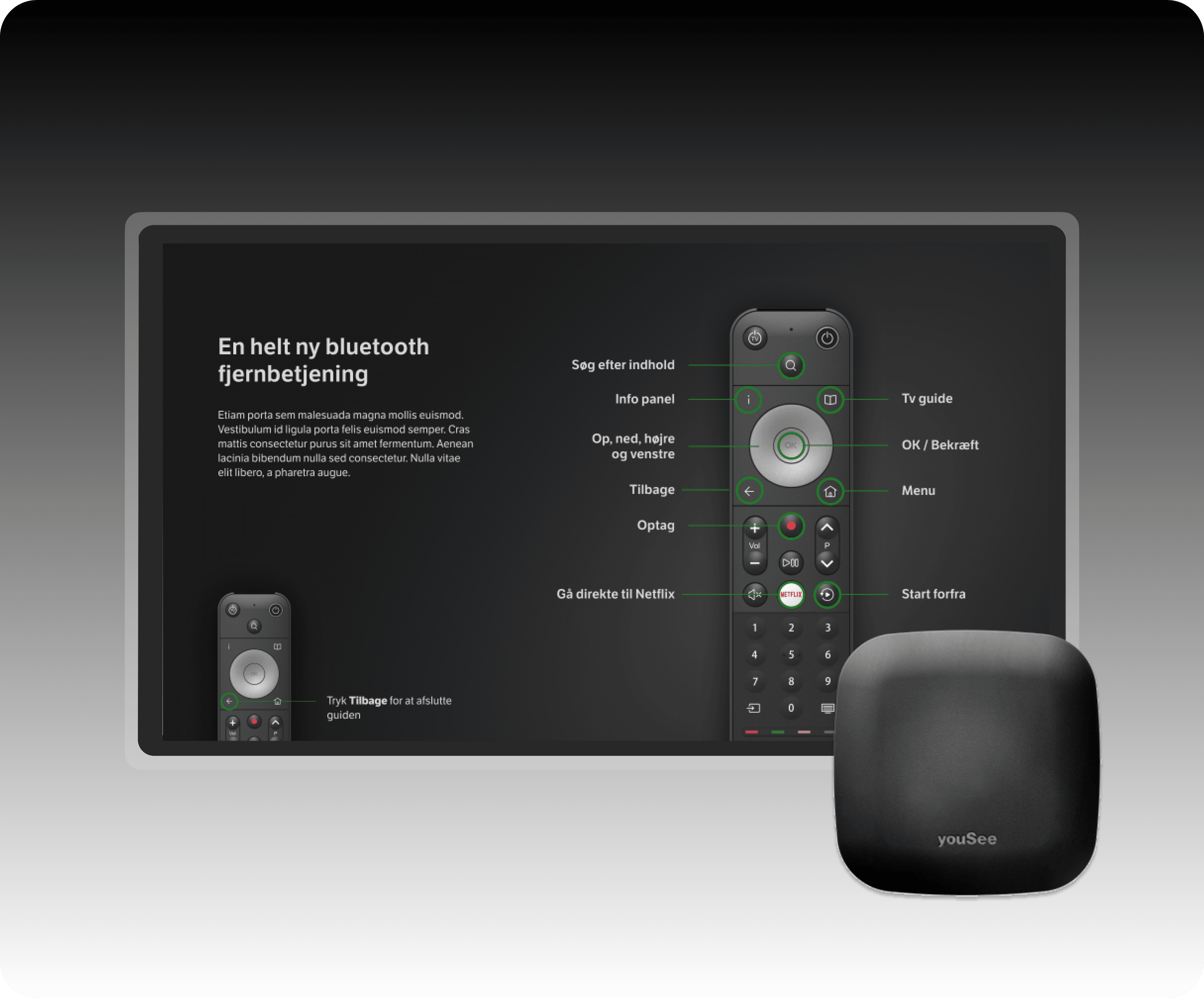
The telco I worked for was preparing to launch a redesigned TV box and remote control with significant interface changes, including altered and removed buttons. User testing showed that customers struggled with navigating the new remote and understanding the redesigned interface. This led to the creation of an onboarding journey for the remote control and UI.

The telco I worked for was preparing to launch a redesigned TV box and remote control with significant interface changes, including altered and removed buttons. User testing showed that customers struggled with navigating the new remote and understanding the redesigned interface. This led to the creation of an onboarding journey for the remote control and UI.

Role

UX Designer

Team

1x Product Manager

2x UX Designers

1x UI Designer

Impact

Improved user confidence and reduced learning curve

Decreased installation errors and support friction

Smoother product launch and market adoption

Role

UX Designer

Team

1x Product Manager

2x UX Designers

1x UI Designer

Impact

Improved user confidence and reduced learning curve

Decreased installation errors and support friction

Smoother product launch and market adoption

Role

UX Designer

Team

1x Product Manager

2x UX Designers

1x UI Designer

Impact

Improved user confidence and reduced learning curve

Decreased installation errors and support friction

Smoother product launch and market adoption

Problem area

Uncertainty in user navigation and installation of redesigned TV box and remote

Before the release of a new TV box and remote, I led mixed-methods research to validate the user experience across three key areas: assessing remote navigation ease given design changes, evaluating user perception of the installation process, and gauging overall design comprehension.


This case study aimed to reduce post-launch support call volume by 25-30% by proactively addressing usability issues through better onboarding and design clarity, freeing support teams for higher-value interactions.

Problem 1

Remote control issue: User testing showed that frequently used buttons on the remote, like the fast forward and TV guide buttons, were difficult for customers to locate.

Problem 1

Remote control issue: User testing showed that frequently used buttons on the remote, like the fast forward and TV guide buttons, were difficult for customers to locate.

Problem 1

Remote control issue: User testing showed that frequently used buttons on the remote, like the fast forward and TV guide buttons, were difficult for customers to locate.

Problem 2

Customers reported critical usability issues: the new white record icon lacked clarity, the TV guide text was too small to read, and the i-button provided unhelpful information instead of expected show details.

Problem 2

Customers reported critical usability issues: the new white record icon lacked clarity, the TV guide text was too small to read, and the i-button provided unhelpful information instead of expected show details.

Problem 2

Customers reported critical usability issues: the new white record icon lacked clarity, the TV guide text was too small to read, and the i-button provided unhelpful information instead of expected show details.

Problem 3

Unboxing issue: Upon recieving the new tv box customers overlooked the provided guide and missed the note about using the new USB cable included in the box.

Problem 3

Unboxing issue: Upon recieving the new tv box customers overlooked the provided guide and missed the note about using the new USB cable included in the box.

Problem 3

Unboxing issue: Upon recieving the new tv box customers overlooked the provided guide and missed the note about using the new USB cable included in the box.

Design goals

What I aimed to achieve

Better remote and UI Onboarding

Create an effective onboarding experience that introduces customers to the new remote layout and UI design, highlighting frequently used buttons and clarifying key features like the updated record icon, TV guide text, and i-button functionality.

Better remote and UI Onboarding

Create an effective onboarding experience that introduces customers to the new remote layout and UI design, highlighting frequently used buttons and clarifying key features like the updated record icon, TV guide text, and i-button functionality.

Better remote and UI Onboarding

Create an effective onboarding experience that introduces customers to the new remote layout and UI design, highlighting frequently used buttons and clarifying key features like the updated record icon, TV guide text, and i-button functionality.

Improve unboxing experience and USB cable visibility

Design a more prominent and intuitive unboxing experience that makes the new USB cable immediately visible and recognisable, ensuring customers understand its importance and use it correctly during the installation process.

Improve unboxing experience and USB cable visibility

Design a more prominent and intuitive unboxing experience that makes the new USB cable immediately visible and recognisable, ensuring customers understand its importance and use it correctly during the installation process.

Improve unboxing experience and USB cable visibility

Design a more prominent and intuitive unboxing experience that makes the new USB cable immediately visible and recognisable, ensuring customers understand its importance and use it correctly during the installation process.

Design decision 01

Remote and UI Onboarding Flow

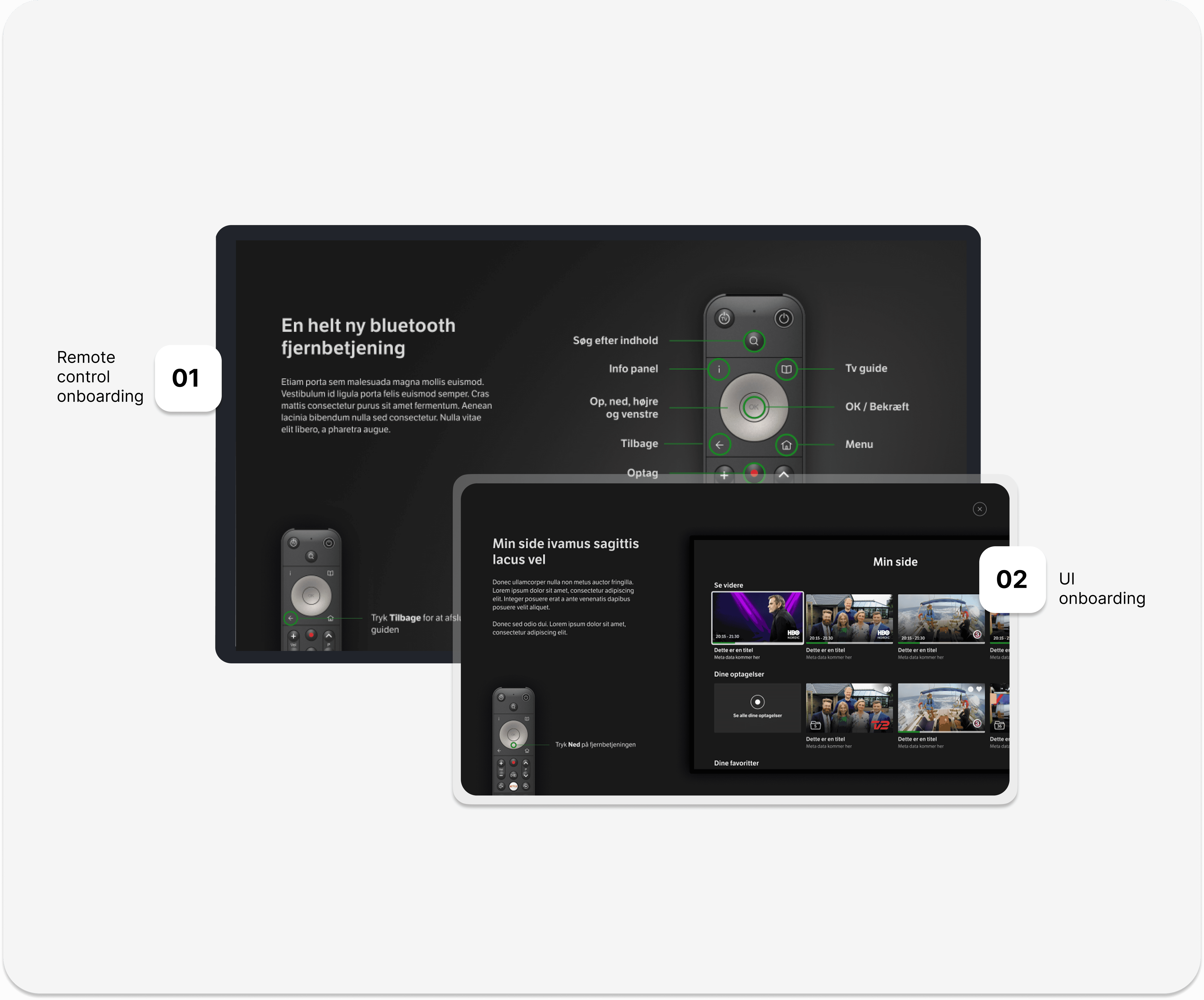
An interactive onboarding experience that triggers when customers first power on the TV box, guiding them through the new remote layout and highlighting frequently used buttons like fast forward and TV guide. This introduction also familiarised users with UI changes, including the updated record icon, improved TV guide text size, and clarified i-button functionality to display show information.
Design decision 02

Enhanced USB Cable Visibility

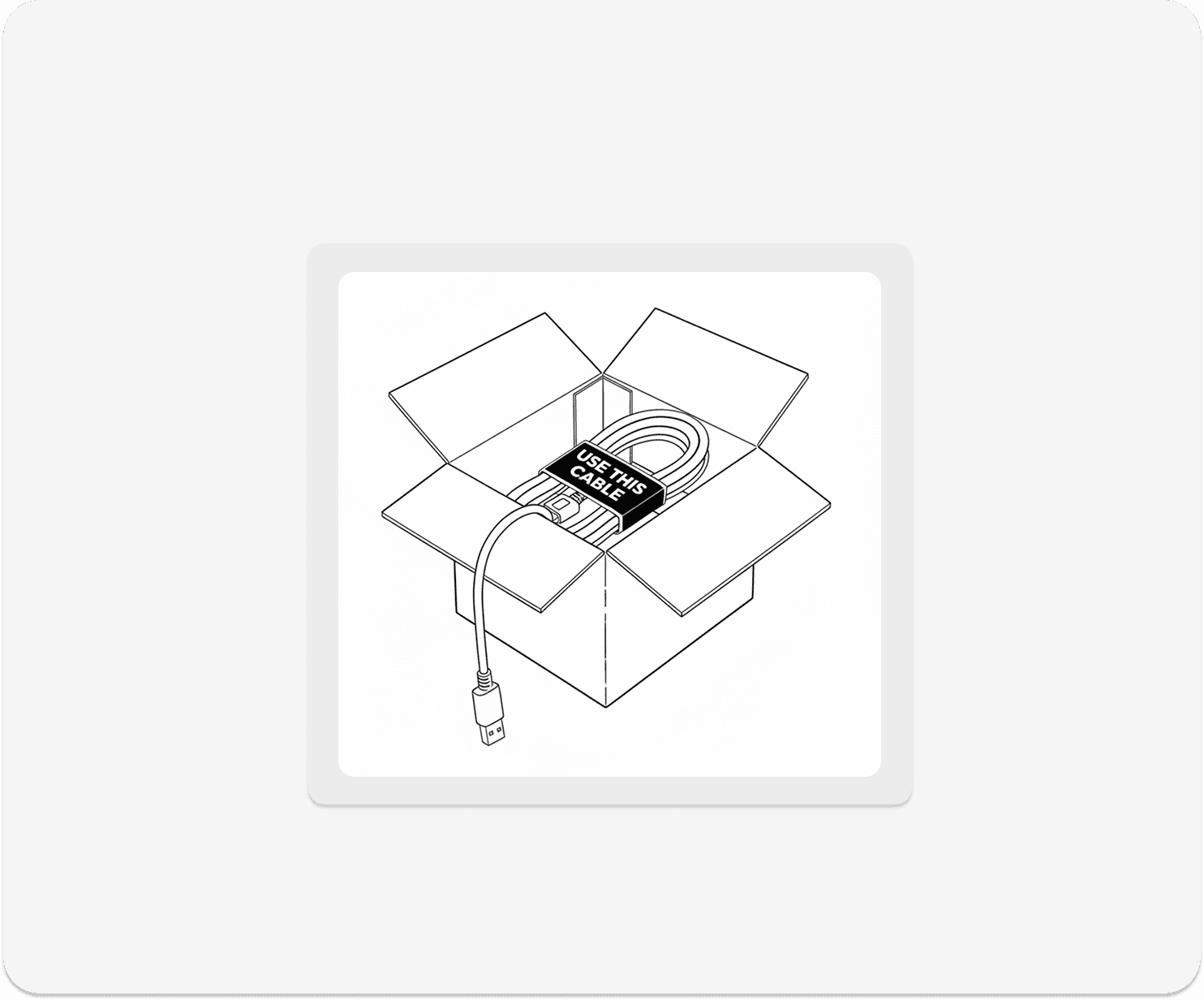
Added a clear, prominent sticker to the new USB cable that explicitly instructs customers to use it instead of their previous TV box cable. This simple but effective visual cue ensures the cable is immediately recognisable during unboxing and installation, reducing confusion and missed setup steps.
Retrospective
Enhancing launch experience and accelerating adoption

Impact

Improved user confidence and reduced learning curve

The interactive onboarding flow enabled customers to quickly familiarise themselves with the new remote layout and UI changes on first use. This reduced confusion and empowered users to navigate the TV box independently, resulting in a 25% reduction in remote-related usability errors.

Improved user confidence and reduced learning curve

The interactive onboarding flow enabled customers to quickly familiarise themselves with the new remote layout and UI changes on first use. This reduced confusion and empowered users to navigate the TV box independently, resulting in a 25% reduction in remote-related usability errors.

Improved user confidence and reduced learning curve

The interactive onboarding flow enabled customers to quickly familiarise themselves with the new remote layout and UI changes on first use. This reduced confusion and empowered users to navigate the TV box independently, resulting in a 25% reduction in remote-related usability errors.

Decreased installation errors and support friction

The prominent USB cable sticker significantly reduced customer confusion during unboxing and installation, minimising missed setup steps. This initiative contributed to a 30% decrease in installation-related support calls.

Decreased installation errors and support friction

The prominent USB cable sticker significantly reduced customer confusion during unboxing and installation, minimising missed setup steps. This initiative contributed to a 30% decrease in installation-related support calls.

Decreased installation errors and support friction

The prominent USB cable sticker significantly reduced customer confusion during unboxing and installation, minimising missed setup steps. This initiative contributed to a 30% decrease in installation-related support calls.

Smoother product launch and market adoption

By proactively addressing key usability pain points identified during research, the telco company I worked for, delivered a more polished, user-friendly product at launch. This resulted in positive first-time customer experiences, supporting a 10% increase in early adoption rates and maintaining a high initial product satisfaction score (CSAT).

Smoother product launch and market adoption

By proactively addressing key usability pain points identified during research, the telco company I worked for, delivered a more polished, user-friendly product at launch. This resulted in positive first-time customer experiences, supporting a 10% increase in early adoption rates and maintaining a high initial product satisfaction score (CSAT).

Smoother product launch and market adoption

By proactively addressing key usability pain points identified during research, the telco company I worked for, delivered a more polished, user-friendly product at launch. This resulted in positive first-time customer experiences, supporting a 10% increase in early adoption rates and maintaining a high initial product satisfaction score (CSAT).